Door Encryption Scheme
Security by obscurity babyyyy
As previously mentioned I recently moved out of a very old run down group house, which is a story for another time, into a so-called luxury apartment on the other side of town, which is what we're here to talk about. All the doors in the building, including the door to my apartment, are access controlled via Door locks. No, not door locks, Door locks:
A company with an utterly un-searchable name but a premium .com domainThese are manipulated via an app I was forced to install on my cell phone. (We have to make compromises in life.) Sometimes when I hold my phone up to a lock it automatically opens via NFC; other times this doesn't work for reasons I haven't fully pinned down, and I have to unlock my phone and tap the button corresponding to the specific door I'm trying to open on the little widget on my home screen.
This works reasonably well and it makes me laugh when I accidentally press one of the widget buttons and open a random door in the building while trying to open Firefox to check Bluesky for the 10th time that day. However I am earth-shakingly confident that one day very soon I am going to walk out my front door without my phone in my pocket and feel my blood curdle in my veins as I hear the lock click shut. In fact this happened the other week, except then I realized my phone was in my pocket after all, so I got a very nice preview of exactly what it'll feel like.
(Or alternatively my phone will just die, or break, or I'll break it (this also almost happened the other week).)
The course of action recommended by property management when you find yourself locked out in this way is to call property management, which we needn't dwell on. Fortunately I also properly needn't dwell on any of this: in addition to these hi-tech features, Door locks also feature combination code entry, and the app presents a personalized pin for each door in the building that I can rotate on command. (Honestly this is kind of cool to me.)
(These pins are seven digits long; divided by the rough number of people in the building I estimate this system is only moderately less secure than if every lock was openable by a single four digit pin. I haven't tried to guess a pin yet but hopefully the locks have a hair trigger timeout.)
Anyway, choose a few relevant doors, write the pins on a piece or pieces of paper, keep those piece(s) of paper in other non-phone objects I'm likely to have with me when I leave the house, why are we still talking about this. And yes, that's all true, and this is really no less secure than carrying a key, which after all is also basically a seven digit (less, really) code that's much harder to read visually but much *much* harder to change quickly. However! Why do that when I could instead make it complicated?
The plan
We have a few desiderata:
- Make it non-obvious that what you're looking at is a Door code. (Hopefully no would-be attackers read the blog.)
- Reversibly obscure the digits themselves. (Obviously.)
- Keep the reversal process easy enough that I can do it in my head, or MAYBE with a pen. (If I have to do this while so drunk and/or tired that I can't do mental math... hopefully I won't mind sleeping on the ground.)
- Require the memorization of a rule, not any particular content. (If there's e.g., a specific number I have to remember, I'll surely forget it.)
So here's what I've cooked up:
- Generate a random 1-digit number, call it the filler digit.
- Generate a random 2-digit number, call it the key.
- Append the filler digit to the 7-digit code to create the 8-digit code.
- Convert the key to its 8-digit base 2 encoding, then treat that encoding as a base 10 number.
- Subtract that 8-digit number from the 8-digit code to create the ciphertext. (If the ciphertext would have fewer than 8 digits, left-pad it with zeroes.)
- Split the key into its 10s digit (left digit) and 1s digit (right digit).
- Sum the left and right digit to create the parity value.
- If the parity value is odd, prepend the left digit to the ciphertext and append the right digit to the ciphertext to create the encoded string.
- If the parity value is even, do the opposite (i.e., prepend the right digit and append the left digit).
- Return the encoded string.
...and then print the encoded string with an assigned 2-character name, so that when I'm looking at a card with several of these I have some small hope of remembering which is which.
The execution
I've written up an implementation of this in Gleam. Here's what an example session with the tool looks like:
(You could avoid passing the '--render' flag to just output the encoded strings. Also, the actual tool prints a 3x4 grid of cards, they wouldn't all fit here.)
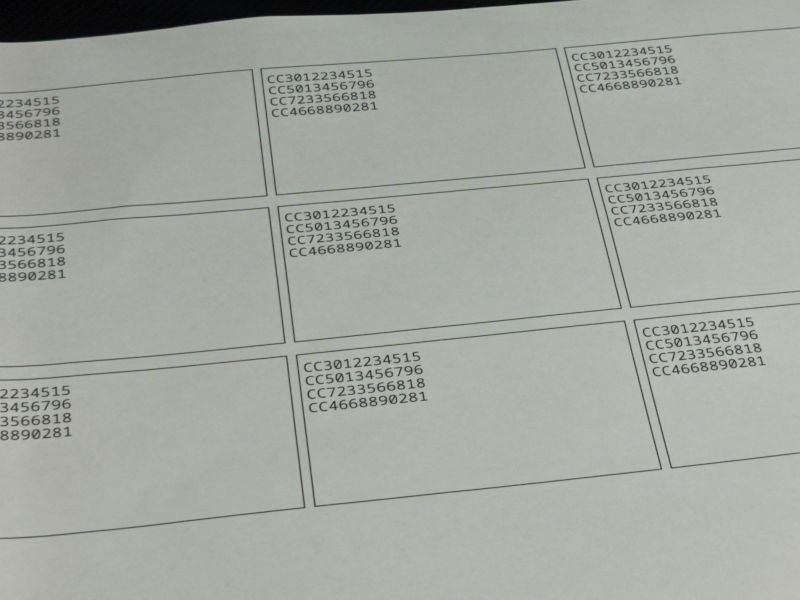
I finally got around to setting up my printer last night while I should've been focusing on my flashcards. (Ask me about typing my 20+ character WiFi password into the printer one character at a time with the up and down arrows for no reason because it didn't work and I ended up using WPS anyway.) So, have the money shot:
I need the CODES, Morpheus
The twist
...of course, my security wouldn't be very obscurity if I had just told you exactly how it worked, now would it?
Don't worry, it was close enough. 🕵️
The kanji of the day is 次
- Its Kodansha Kanji Learner's Course keyword is NEXT.
- Its readings are つ, つぎ, ジ, and シ.
They're always saying this in the previews, so I was very excited to learn this kanji. It's on the growing list of characters that I don't even remember the mnemonic for, I just remember what it is. I like the (so far relatively) unusual *hen* part (if you can call it that) that looks like the radical form of 水/WATER, 氵. (No I don't know where the rest of it went either.) Wiktionary claims that 冫 is a radical form of 仌, which is an ancient pictograph representing two blocks of ice (modern form 冰 or 氷, neither of which I've learned, meaning "ice"), except actually the 冫in 次 is apparently unrelated to 仌 despite being representable in Unicode using it. So that's neat!
Discuss this post on Bluesky